Housings (seat stiffness)
How stiff a bearing seat is in a housing wall, from a plane-stress plate, a 3D solid with hub and ribs, or an imported FE mesh or reduced matrix, and how that stiffness acts on the shaft.
What it is for
A shaft on rigid supports is stiffer than one in a real housing. The Housings module solves the housing wall by finite elements and gives each bearing seat's radial stiffness (and, in 3D, its tilt stiffness). Link a shaft support to the housing, and that stiffness acts in series with the support and its bearing. Deflections, bearing loads and critical speeds then include the housing's compliance.
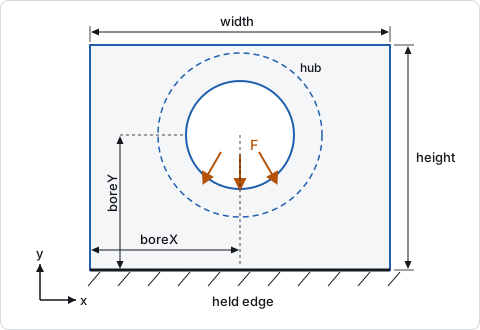
The housing-seats template puts a motor shaft's two 6207 bearings in a grey-iron end wall, 200 × 150 × 20 mm, with a Ø110 × 40 mm hub round a Ø72 mm bore, held at its bottom edge and solved as a 3D solid.
Building a housing
+ Housing adds a wall. + Import FE model brings in a housing from another program (see below). The inspector shows these groups in order.
Wall
- Width, Height and Wall thickness (mm).
- Young's modulus and Poisson's ratio. Grey iron is typically 110 000 MPa and 0.25.
- Density (its mass in the critical speeds), 7 200 kg/m³ by default (grey iron).
- Model: "Plane-stress plate" (the default) or "3D solid (hub, seat, tilt)". Only the solid gives a tilt stiffness and takes a hub, ribs and bolts.
- Elements along the longer side, 60 by default (20–100; the solid uses at most 40). The mesh follows the bore: rings of elements round it, spokes out to the edges.
Hub and seat (3D)
Hub diameter, Hub length and Hub offset from the wall; Bearing seat width (by default the hub's length, else the wall's thickness) and Seat offset from the wall. A seat as wide as the whole wall gives the plate's stiffness.
Ribs (3D)
Each row is a rib from a bore out to the plate's edge: From bore (1 unless set), Angle (0° along +x, 90° up, −90° down to a base held at the bottom), Width, Depth (positive on the front face, negative on the back) and End depth. An end depth of 0 makes a tapering gusset.
Bearing bore (seat 1)
Bore diameter, Centre x and Centre y, measured from the plate's lower left corner.
More bores (seats 2, 3, …)
Further bores in the same wall, each with its diameter, centre and, for the solid model, hub and seat width. The wall is split between the bores and meshed round each. In the Shaft module, a support in this housing then names its Seat number. The seats push each other through the wall: the shaft solve uses the compliance between them, and shafts in one wall are solved again until those motions settle.
Loads on the housing
- Temperature rise over assembly (K) with the Expansion coefficient (10.5·10⁻⁶ 1/K for grey iron by default).
- Its own weight (gravity down).
- Speed, for a part that turns about the shaft axis through seat 1. Its centrifugal growth loosens a bearing's outer ring fit on that seat.
- Point loads (at the nearest node) and, for imported meshes, Forces on faces.
These move the seats. The shaft follows as if the bearings' ground moved. A bore that only grows evenly does not move the shaft.
Held edges
Tick Bottom, Top, Left and Right for the edges bolted or welded to a stiff frame. For the 3D solid, Bolted joints per held edge (3D) and Stiffness of one joint (N/mm, for example from the Bolts module) put the held edges on bolted joints of finite stiffness instead of a rigid hold.
Linking to the shaft
In the Shaft module, select a support and choose the housing in Housing (FE seat stiffness in series). The wall's vertical stiffness acts in the shaft's xy plane and its horizontal stiffness in the xz plane, each in series with the support's own stiffness and its bearing. In the 3D model, the seat's tilt stiffness acts in series with the support's tilt stiffness. A support that is free to tilt stays free.
The housing's density gives each seat its share of the housing's mass (Guyan reduction). In the critical speeds, a housed support is the bearing's spring to a housing node with that mass, held by the seat's stiffness, so a heavy housing lowers the critical speeds.
A bearing whose support sits in a wall or imported-mesh housing can tick "Elastic outer ring in its housing" in the Bearings module. Its outer raceway then deforms with the housing's compliance round the bore.
Imported housings
+ Import FE model accepts three kinds of file:
- A STEP solid (.step/.stp; desktop app on Windows). It is meshed into quadratic tetrahedra by Netgen. STEP element size sets the element size (automatic: about a twentieth of the part's largest size, in millimetres whatever length unit the file uses).
- A Nastran mesh (.bdf/.dat/.nas) with GRID nodes, CTETRA, CPENTA and CHEXA elements, MAT1 and SPC/SPC1. It is solved in the app. Other cards (rigid links, shells, loads) are listed as not read, and pyramids are refused. The limit is 300 000 nodes.
- A stiffness matrix reduced to the seat nodes: a Nastran DMIG punch, Abaqus MATRIX INPUT, a CSV of node, dof, node, dof, value, or an Ansys Harwell–Boeing or Matrix Market file with its .mapping (pick both). The seats' compliance is the matrix's inverse at the seat nodes. The housing must be held in that model, or the matrix is refused as singular.
For a mesh, the bores along the shaft axis are found as seats, and the lowest face is held unless you choose otherwise. The inspector then shows "Bearing seats", Model axis along the shaft, Model axis up, the hold-face checkboxes ("Hold the lowest x face" and so on) and boxes of held faces. For a matrix, it shows Seat nodes, seat 1 first, Model length unit (forces in N) and the two axes.
In the housing view, hovering over a face highlights its patch, and clicking picks it (or choose it from the Face patch list). Then choose Hold rigidly, add a force, or Seat it here on a bore. Held patches are drawn dark grey, loaded ones amber with arrows, and seats blue.
Results
The results show the Seat stiffness (horizontal and vertical, and their harmonic mean), the Tilt stiffness for the solid model, and the Wall stress in MPa per kN of vertical bearing load. The facts add the seat mass and the mesh size, each seat's stiffness when the wall has several bores, the seat motion under loads on the housing and the centrifugal growth of a turning part. The housing-seats template gives:
| Result | 3D solid (template) | Same wall as a plane-stress plate |
|---|---|---|
| Seat stiffness, horizontal / vertical | 896.6 / 3 551 N/µm | 742.9 / 3 254 N/µm |
| Mean seat stiffness | 1 432 N/µm | 1 210 N/µm |
| Tilt stiffness, horizontal / vertical | 0.2103 / 0.1683 kN·m/mrad | none |
| Wall stress | 1.078 MPa/kN | 1.115 MPa/kN |
| Seat mass, down / sideways | 0.9065 / 2.728 kg | 0.6922 / 2.119 kg |
A wall held only at its bottom is much softer sideways than vertically. On the shaft, the housing lowers the first critical speed from 63 582 rpm (rigid seats) to 57 653 rpm. The stiffness at the pulley load drops from 134.1 to 126.5 N/µm.
The module has no pass/fail checks of its own. Its effect shows in the shaft's deflection, tilt and critical speed checks and in the bearing results. To stiffen a seat, hold more edges, add a hub or ribs (3D), thicken the wall or use a stiffer material.
Scope and limits
- The model is linearly elastic. Held edges are rigid, or springs when bolted joints are given. No gaps, contact or slip are modelled.
- The bearing load is a cosine pressure on the loaded half of the seat. Seat stiffness is the load over the seat's mean displacement.
- Seat motion from loads on the housing is the first harmonic of the bore's radial displacement.
- The coupling between seats is left out of the critical speed modes, which take each seat's own stiffness and mass.
- A reduced matrix gets no centrifugal growth (a warning says so) and cannot carry an elastic outer ring.
- STEP import runs in the desktop app on Windows only.
From the command line
axm new motor.axm.json --template housing-seats
axm solve motor.axm.json
axm housing import motor.axm.json end-wall.step --element-size 6
axm housing patches lists the face patches of an imported mesh.