Shaft
Build a stepped shaft from sections, place supports and loads, and read its deflection, bending moment, stress, support loads and tilt.
The shaft module models a stepped shaft as a beam of finite elements. You build it from sections, hold it on supports and load it with forces, moments and torques. It gives the deflection, bending moment and von Mises stress along the shaft and the load and tilt at each support. A support can be linked to a bearing, which is then loaded by that support's reaction. Strength and vibration have their own pages: Shaft strength and Critical speeds and vibration.
The workspace
On the left, the inspector has four tabs: Sections, Supports, Loads and Material; select an item in a list to edit it below. The centre shows the drawing, the charts and the vibration results; the right column the results. x runs along the shaft from its left end, y and z are lateral (see Units and conventions).
Inputs
Sections
The Sections tab (title Geometry) lists the sections from left to right with their diameter, length and span. Choose + Section to add one at the right end; it starts with the diameter and length of the last section. For the selected section:
| Field | Unit | Meaning |
|---|---|---|
| Outer diameter | mm | Diameter of the section. |
| Bore | mm | Inner diameter for a hollow section; 0 for a solid one. |
| Length | mm | Length of the section. The sections follow each other without gaps. |
Notch and strength details opens the Material tab, where shoulder radii and notches are set. Every diameter step becomes a shoulder in the strength check.
Supports
The Supports tab lists the supports with their name, position and axial role. Choose + Support to add one. For the selected support:
| Field | Unit | Meaning |
|---|---|---|
| Position | mm | Axial position from the left end. |
| Floating / Locating | A locating support holds the shaft axially; a floating one lets it move. A shaft needs at least one locating support; two or more make a cross-located pair. | |
| Bearing | None (rigid support only), a bearing of the project, or a new bearing from the presets (New bearing: common and one group per series). Presets that sit on the shaft's diameter at the support over their whole width come first, under "New bearing: fits the Ø35 mm seat", then those of that bore too wide for the seat there; see Bearings. | |
| Radial stiffness | N/mm | Empty is rigid. A value makes the support a spring. |
| Tilt stiffness | N·mm/rad | Empty is free to tilt. A value holds the shaft's slope. |
| Axial stiffness (cross-located shafts) | N/mm | Locating supports only. Empty takes the linked bearing's axial stiffness, else rigid. |
When a support is linked to a bearing, Open BR1 in the bearing module → takes you to it. The bearing then carries this support's reaction in both planes and its axial load. A self-aligning bearing (self-aligning ball, spherical roller) on its own is free to tilt: a tilt stiffness given to its support is ignored, with a warning.
When the project has housings, Housing (FE seat stiffness in series) links the support to a housing wall, and Seat picks the bore when the housing has several. The seat's stiffness then acts in series with the support. See Housings.
Loads
The Loads tab lists the loads with their position and radial force. Choose + Load to add one. For the selected load:
| Field | Unit | Meaning |
|---|---|---|
| Position | mm | Where the load acts. |
| Force y, Force z | N | Lateral forces. A downward force in the xy plane is negative. |
| Axial force x | N | Taken by the locating support. |
| Torque | N·mm | Torque about x. |
| Moment xy, Moment xz | N·mm | Applied bending moments (they turn +x towards +y or +z). |
| Part mass, Part unbalance, Part polar inertia, Part diametral inertia, Part length | kg, g·mm, kg·m², mm | The part at the load (gear, pulley, coupling), for the vibration results and, with weight switched on, as a weight. See Critical speeds and vibration. |
The torques on a shaft must balance: power in equals power out. Tick Takes the torque that balances the shaft (e.g. the output coupling) on the load where power enters or leaves. That load takes whatever torque the other loads leave, shown in its Torque (balances the shaft) field, so the shaft stays balanced when gear efficiencies or other loads change. Use it once per shaft.
Material
The Material tab (title Material and strength) holds the strength check (see Shaft strength) and Material and limits:
| Field | Unit | Meaning |
|---|---|---|
| Young's modulus | MPa | The templates use 210 000 MPa for steel. |
| Poisson's ratio | The templates use 0.3 for steel. | |
| Thermal expansion (bearing fits) | 1/K | Empty is steel, 12e-6. Used by bearing fits and thermal growth. |
| Vibration damping (fraction of critical) | 0.02 by default; used by the unbalance response. |
Limits for the checks turn results into pass/fail checks. Empty means no limit:
| Limit | Unit | Typical value |
|---|---|---|
| Max deflection | mm | The templates use 0.05 to 0.1 mm. |
| Max tilt at bearings | arcmin | Deep groove ball bearings 2–10′, cylindrical roller 3–4′, tapered roller 2–4′. |
| Max von Mises stress | MPa | A nominal stress limit (the templates use 120 to 200 MPa); the strength check is the fatigue assessment. |
| Min 1st critical speed | rpm | Above the highest running speed with a margin; the electric motor template uses twice its running speed. |
New blank projects take their limits from File › Settings › Defaults for new projects and bearings.
Options
| Option | What it does |
|---|---|
| Couple linked bearings (stiffness, tilt moments) | Each support linked to a bearing follows that bearing's non-linear radial and tilting stiffness; a support's own stiffness then acts as the housing, in series. The shaft's slope loads the bearing with a moment, and loads shift towards the stiffer bearing. The results show each bearing's stiffness k and moment M. Self-aligning bearings are coupled radially only. |
| Include weight (shaft and parts, on every shaft) | Adds the shaft's own weight and each Part mass as loads. Gravity points along sets the direction: −y or −z for a horizontal shaft, −x or +x for a vertical one. |
| Axial thermal growth against the housing | Grows the shaft against the housing by from the Assembly temperature (20 °C if empty). Empty temperatures come from the linked bearings' mounting data, an empty Housing expansion from the housing or the bearings, else steel. Each support reports its axial travel. |
| Cross-located pair | Shown with thermal growth and two or more locating supports. Choose X, face to face or O, back to back, and the Mounted preload in N. The growth adds to the preload face to face and takes it off back to back. Linear springs: a bearing that lifts off is not modelled. |
All options are off by default, so existing projects keep their results.
The drawing
Above the drawing:
- 2D drawing / 3D model switch the view. In 3D, drag to orbit, scroll to zoom and right-drag to pan. Stress shapes shows the bearing contact pressure. The shape picker shows the deflection under the loads or any mode shape.
- xy plane / xz plane choose the bending plane shown in the drawing and the charts (vertical and horizontal).
- Deflection (2D only) draws the deflected shaft, exaggerated; the legend gives the factor.
- Stress colours colours the shaft by von Mises stress, from 0 to the stress limit (or to the highest stress when there is no limit).
In the 2D drawing, select a section, support or load to edit it:
- Drag a section's edge to change its length, or its outline to change its diameter.
- Drag a support or a load along the shaft to move it. Drag a load up or down by its tail to change its force.
- While you drag a support with a bearing of known bore, the seats of that bore that take the bearing's whole width are shaded green and the support snaps onto them within a few pixels (hold Alt, or Option on a Mac, to place it freely). Where the bearing does not fit, it turns red with a note such as "bore 35 ≠ Ø42"; you can still drop it there, and the seat check fails.
- The arrow keys adjust the selected item (Shift for bigger steps): ← and → move a support or load by 1 mm or change a section's length; ↑ and ↓ change a load's force by 100 N or a section's diameter by 0.5 mm. Delete removes it. See Keyboard shortcuts.
Charts
Along the shaft shows three charts in the chosen plane: Deflection y (or z) in µm, Bending moment xy (or xz) in N·m, and von Mises stress in MPa. The deflection and stress limits are drawn as lines. Hover a chart or the drawing to read x, deflection, moment and stress at that point.
Results
Checks banner
The banner at the top of the results says "All 3 checks pass" or how many fail, then lists each check with its value against its limit, for example Shaft deflection "189 / 100 µm". A check above 85 % of its limit is marked as close to it. Without limits the banner says "Set limits to get pass/fail checks."
Key results
| Result | Meaning |
|---|---|
| Max deflection | Largest deflection (resultant of both planes) and where. |
| Max stress | Largest von Mises stress (bending, axial force, torsion) and where. |
| Bearing tilt | Largest slope of the shaft at a support, in arcmin. |
| 1st critical speed | The governing critical speed, "bending, non-rotating" or "forward whirl, turning". |
| Stiffness at L1 | Load over deflection at each load, in N/µm. |
| Shaft mass | Mass and length of the shaft. |
Under Bearings, each support shows its radial load, a bar for its share, the axial load and tilt, and with coupling the bearing's stiffness and moment. A linked bearing shows its L10m life; select it to open the bearing. Notes lists warnings with hints.
When the shaft cannot be solved, the results column says Can't solve yet and lists the problems with a hint each (for example a shaft that is not held axially).
Fixing a failing check
- Deflection: increase the diameter (deflection falls with the fourth power of it), shorten the span, or move the supports towards the load.
- Tilt at bearings: the same levers; or choose a bearing that accepts more tilt.
- Stress: increase the diameter at the peak, or reduce the overhang of an overhung load.
- Critical speed: see Critical speeds and vibration.
axm sweep and the optimiser test a lever over a range.
Example: the simple shaft
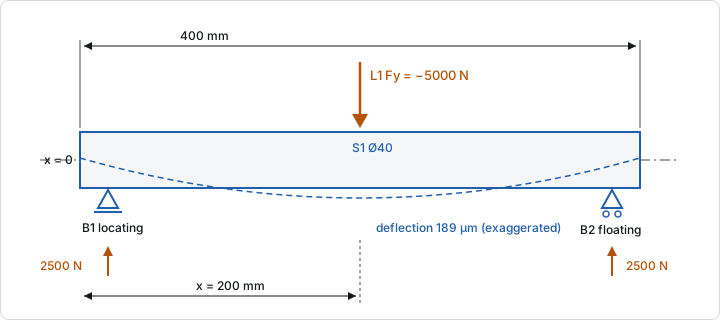
Open the example: a Ø40 × 400 mm shaft on supports at x = 20 mm (locating) and x = 380 mm (floating), with Fy = −5000 N at x = 200 mm. It gives:
| Result | Value |
|---|---|
| Max deflection | 0.1892 mm at x = 200 mm |
| Max bending moment | 450 N·m at x = 200 mm |
| Max von Mises stress | 71.62 MPa at x = 200 mm |
| Bearing tilt | 5.276′ at each support |
| Support loads B1, B2 | 2500 N radial each |
| Stiffness at L1 | 26.43 N/µm |
| Shaft mass | 3.946 kg |
| 1st critical speed | 36 996 rpm (bending, non-rotating) |
The deflection check fails: 0.1892 mm against the template's limit of 0.1 mm (189 %). Tilt (53 % of 10 arcmin) and stress (48 % of 150 MPa) pass. A diameter of 48 mm brings the deflection to 0.09229 mm (92 %) and all three checks pass.
Several shafts
A project can hold several parallel shafts, for a gearbox or a belt drive. Choose + Add shaft at the top of the inspector. Tabs above the drawing then switch between the shafts; double-click a tab or choose Rename to rename it, and Remove shaft to delete it. Gear pairs and drives mounted on two shafts load both with their tooth or strand forces. The single-stage gearbox template is a starting point. Include weight applies to every shaft.
Method and limits
- Timoshenko beam elements (with shear deformation); supports rigid or linear springs. Stresses from bending, axial force and torsion combined by von Mises.
- Nominal stresses only: stress concentrations at shoulders and grooves are not in the stress result or the stress check. The strength check applies notch factors.
- Without coupling, bearings see only forces; the supports are rigid or the springs you give.
From the command line
axm new shaft.axm.json --template simple
axm solve shaft.axm.json
axm sweep shaft.axm.json sections.S1.outerDiameter --from 40mm --to 50mm --steps 6